

Before we dive into building, let’s take a step back and understand the problem space, why traditional approaches are insufficient today, and why LLMs are particularly well-suited to solve this challenge.
1. The Problem: Traditional Anti-Tracking Has Limits
Online tracking refers to the collection of data about your internet activity. This can include:
- Pages you visit: Your browsing history and navigation patterns
- Time spent: How long you spend on specific content
- Interactions: What you click on, hover over, or engage with
- Device information: Your browser, operating system, screen resolution
- Location data: Your approximate geographic location
Common tracking methods
- Cookies: Small text files stored on your device
- First-party cookies: Set by the site you’re visiting
- Third-party cookies: Set by external domains (often advertisers)
- Browser fingerprinting: Creating a unique profile based on your browser and device characteristics
- Canvas fingerprinting
- WebRTC fingerprinting
- Font and plugin detection
- Tracking pixels: Tiny, invisible images that load when you open a page or email
- URL parameters: Information added to URLs to track origins and user journeys
- UTM parameters (e.g.,
utm_source,utm_campaign) - Click IDs and session identifiers
- UTM parameters (e.g.,
Online tracking has evolved rapidly. Initially, blocking known domains using simple blocklists was enough to protect user privacy. Popular solutions like EasyPrivacy, Adblock Plus, and uBlock Origin use such manually maintained lists to detect and block tracking attempts.
However, over time, trackers became more sophisticated:
-
Dynamic URLs: Trackers now generate randomized URLs.
-
Subdomain abuse: Legitimate domains host tracker scripts from hidden subdomains.
-
Stealth techniques: Trackers mimic benign resources like images (
pixel.gif) or fonts to avoid detection.
Manual rule-based systems simply cannot keep up with the pace of change. They suffer from:
-
Limited coverage: New trackers often bypass outdated rules.
-
High maintenance: Thousands of new rules must be created and maintained.
-
False positives: Overblocking causes functional breakage on websites.
-
False negatives: Miss trackers that use new or obfuscated patterns
- Evasion techniques: Trackers evolve to avoid detection patterns
Clearly, a new approach is needed — one that can understand the intent behind a network request, not just the static signature.
2. The Opportunity: Why LLMs Are a Game-Changer
Large Language Models represent a paradigm shift in how we can approach tracker detection:
-
Semantic understanding: Recognizing the meaning behind text, URLs, or even web requests.
-
Generalization: The ability to spot patterns they haven’t seen before.
-
Adaptability: By fine-tuning, we can specialize these general models into domain-specific experts.
In the context of anti-tracking:
-
An LLM can understand the structure of a URL and infer whether it’s likely to be a tracker.
-
It can consider subtle hints like path names (
/track,/ad,/metrics) or parameter names (utm_source,sessionid) that traditional systems might miss. -
It can also be updated quickly by fine-tuning on new data, rather than manually rewriting hundreds of rules.
In short, LLMs allow us to move from static detection to dynamic understanding.
3. What We’ll Build Together
This project is structured in four key parts:
-
Data Preparation:
We will generate synthetic URL datasets labeled as tracker or non-tracker using a data generator script.
You will learn how to simulate real-world traffic and label it using popular privacy blocklists like EasyPrivacy. -
Model Training:
We will fine-tune a lightweight Transformer model, such as DistilBERT, specifically on this tracking detection task.
The model will learn to classify a URL as either a tracker or non-tracker with high confidence. -
API Server:
We will create a Flask backend that serves the trained model over HTTP.
Our browser extension will call this API to get real-time predictions while browsing. -
Browser Extension:
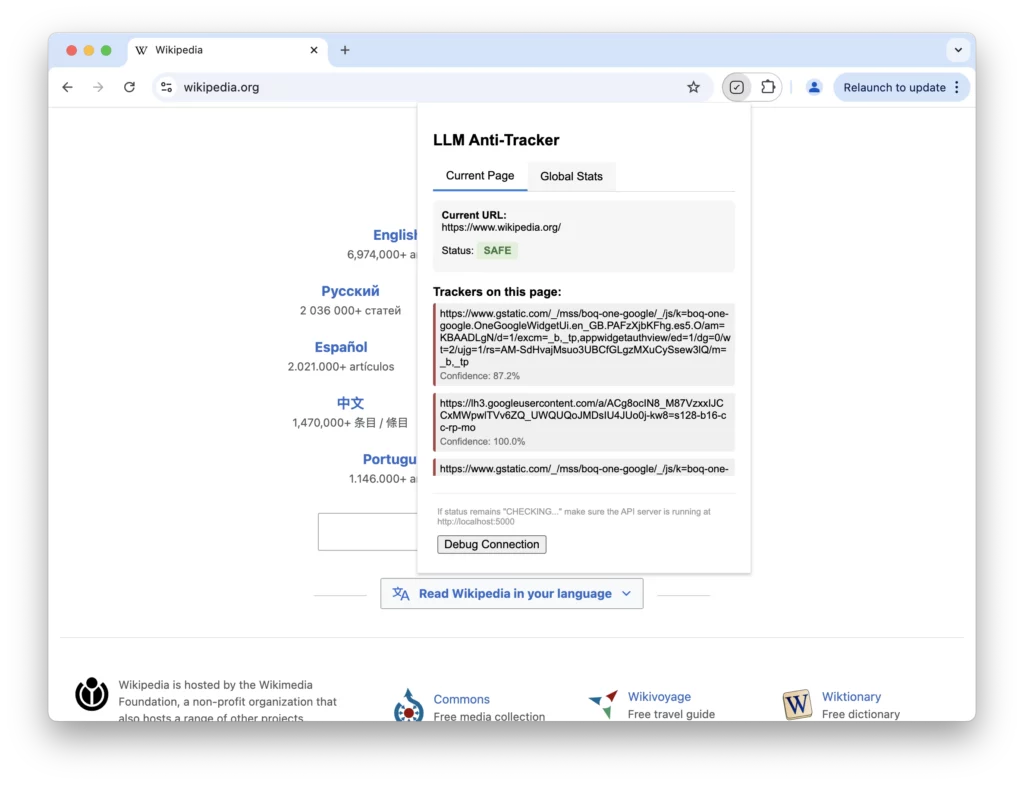
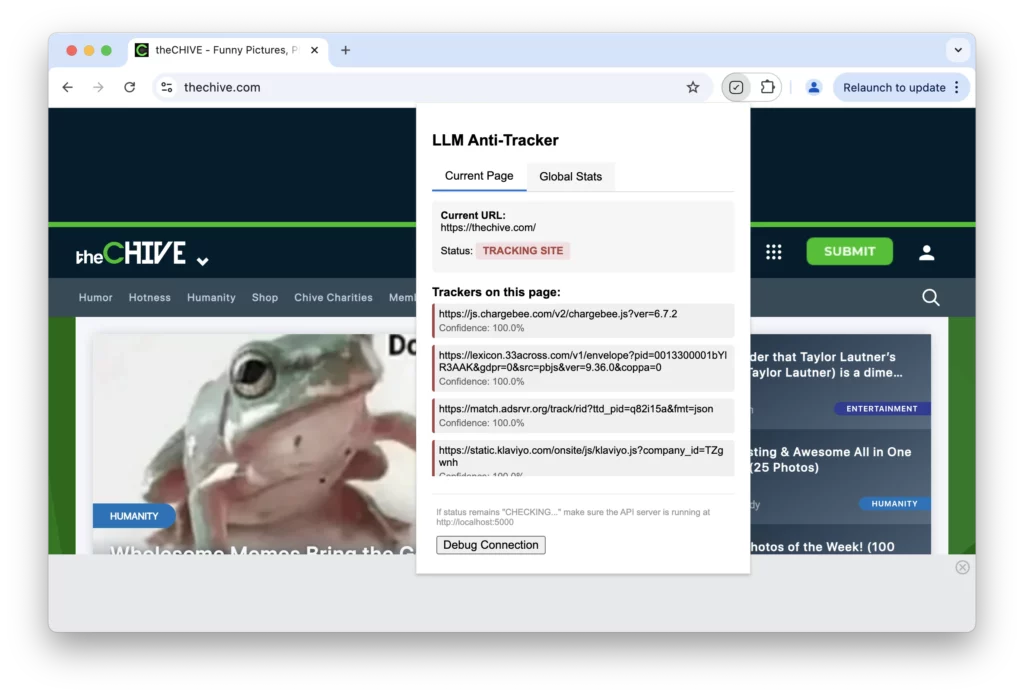
Finally, we’ll build a Chrome extension that intercepts web requests, sends the URL to our server, and displays tracker detection results to users.
The end-result?
You’ll have a fully functional LLM-powered anti-tracking browser extension that is adaptive, intelligent, and ready for real-world use. Here’s how information flows through your system:
- User visits a webpage
- Browser extension intercepts network requests
- URLs are sent to the API server (with caching)
- Model classifies each URL
- Extension detects requests based on classification
- Statistics are updated in the extension UI
4. Setting Up the Development Environment
Before starting, let’s make sure we have the right tools installed.
a. System Requirements
-
A machine with Python 3.8+ installed.
-
Google Chrome browser (for extension testing).
B. Code and Setup Instructions
-
Visit the llm-anti-tracking github repository to get the code and instructions to setup the system via virtual environment.
c. Browser Extension Tools
No heavy setup needed! Chrome comes with Developer Mode, where you can load extensions manually.
We’ll create a folder containing a few key files (manifest.json, background.js, popup.html, etc.), which Chrome will recognize as an extension. All files and boilerplate code is already available at the above github repository.
5. Series Roadmap: What to Expect
Here’s a quick overview of the journey we’ll take:
| Step | Topic | Outcome |
|---|---|---|
| 1 | Data Preparation | Labeled URL dataset |
| 2 | Model Training | Trained LLM classifier |
| 3 | API Server | Prediction API |
| 4 | Browser Extension | Full anti-tracking extension |
Each session builds upon the last – by the end, you’ll have the skills to create smarter privacy tools powered by modern AI!
6. Summary
Today, you learned:
-
The problem of online tracking and its prevalence
-
Why traditional anti-tracking methods are becoming outdated.
-
How LLMs can provide a semantic, scalable, and adaptive solution.
-
What the complete system we will build looks like.
-
How to set up your machine to start the project.
In the next session, we’ll dive into data generation and preparation, creating the foundation for our ML model. We’ll explore URL structures in depth and build a robust dataset for training our tracking detector.
Remember, the code for this tutorial is available on GitHub, and you can follow along at your own pace.
Next Session Preview: Generating and Preparing Synthetic Tracking Data
Visit Lumen Home