

Most Engineers Understand Only 10% of Claude Code
A Practical Guide to Claude Code Subagents, Skills, and Multi-Agent Workflows
Half the questions in our last Claude Code session were some version of the same thing: what exactly is a skill — and how is it different from an agent, from project knowledge, from a plugin?
The confusion is understandable. The terminology is new, the concepts overlap, and nobody has drawn the map yet.
This post draws it.
It also covers the architecture that makes Claude Code genuinely powerful — subagents, parallel tasks, real workflows — and what it looks like in practice with prompts you can adapt immediately.
This is part two of our Claude Code FAQ series. Part one covers setup, cost, context management, and whether Claude Code is worth your time: Read part one here.
The vocabulary problem — MCPs, skills, agents, connectors
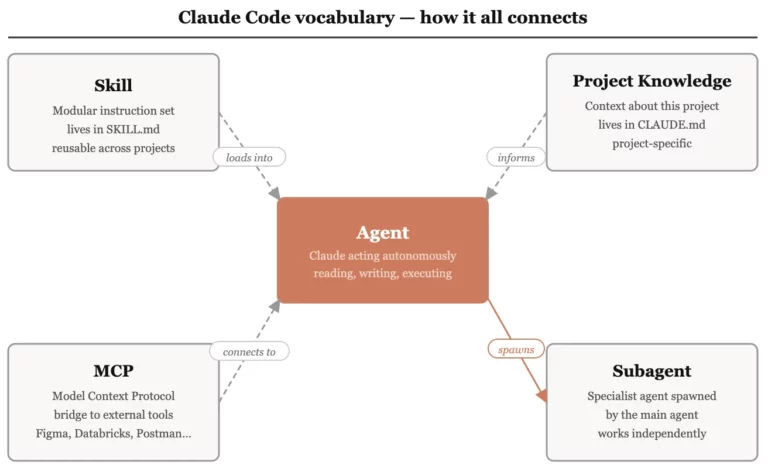
Before anything else works, this needs to be clear. These four terms get used interchangeably in conversations and they are not the same thing.
What are MCPs and connectors?
MCP stands for Model Context Protocol. It is how Claude connects to external tools and data sources outside your codebase.
Think of MCP as a bridge. Without it, Claude Code can only see what is inside your project directory. With an MCP connection, it can reach outside — to Figma, to a database, to a third-party API — and pull live data directly into its workflow.
Connectors are the ready-made integrations available through claude.ai/customize/connectors — services like Databricks, Postman, and Wix that Claude can connect to without you building the bridge yourself.
MCP is the protocol. Connectors are the pre-built implementations of it.
What is the difference between skills and agents?
A skill is a set of instructions. An agent is the entity that executes them.
An agent is Claude Code acting autonomously — reading files, running commands, making decisions, producing outputs. It is the worker.
A skill is a modular instruction set that tells the agent how to do a specific type of task. It is the job description. Each skill lives in a SKILL.md file that Claude reads, matches to your request, and executes.
One agent can hold multiple skills. When you give it a task, it finds the skill that matches, loads the instructions, and gets to work.
What is the difference between skills and project knowledge?
Project knowledge is context. Skills are capabilities.
Your CLAUDE.md file is project knowledge — it tells Claude what this project is, what conventions to follow, what the architecture looks like. It is the briefing document.
A skill tells Claude how to do something specific — generate a slide deck, analyse a dataset, produce a visual report. It is a reusable capability that can be picked up and applied across different projects.
Project knowledge is project-specific and lives in CLAUDE.md. Skills are reusable and live in their own SKILL.md files. Both load into the context window — which is why keeping each one lean matters.
| What it is | Where it lives | Scope | |
|---|---|---|---|
| Project knowledge | Context about this project | CLAUDE.md | Project-specific |
| Skill | Instructions for a task type | SKILL.md | Reusable across projects |
| Agent | Claude acting autonomously | Runs in the session | Task-scoped |
| MCP | Connection to external tools | Configured separately | Tool-specific |
Tools and control — what Claude Code can access
What tools does Claude Code have access to — and why does it matter?
Claude Code ships with a built-in toolset. Knowing what's in it changes how you prompt and what you can delegate.
Out of the box, Claude Code can use:
- File operations — read, write, create, delete files in your project
- Shell commands — run terminal commands, scripts, build processes
- Bash — execute bash scripts directly
- Search tools — grep, find, diff across your codebase
- MCP tools — any external connections you have configured
- Web search — look up documentation, APIs, or current information
Why this matters: when you understand what tools Claude has available, you stop asking it to "help with" things and start directing it to do things. The shift from prompting to directing is where the productivity gains actually live.
Why do I need to specify tools explicitly — can't Claude just pick?
It can infer in simple cases. For production work, explicit is always safer.
If you ask Claude to analyse data without specifying how, it will make a choice. Sometimes the right one. Sometimes not — it might reach for a library you don't have installed, or one that doesn't fit your project's conventions.
In your CLAUDE.md or directly in your prompt, specifying the tools you want — pandas for data manipulation, pytest for testing, bash for script execution — removes the guesswork. It also reduces hallucination risk. Claude is less likely to invent a tool that doesn't exist when you have told it exactly what to use.
Subagents and parallel work — where the real power lives
What are subagents and what can they actually do?
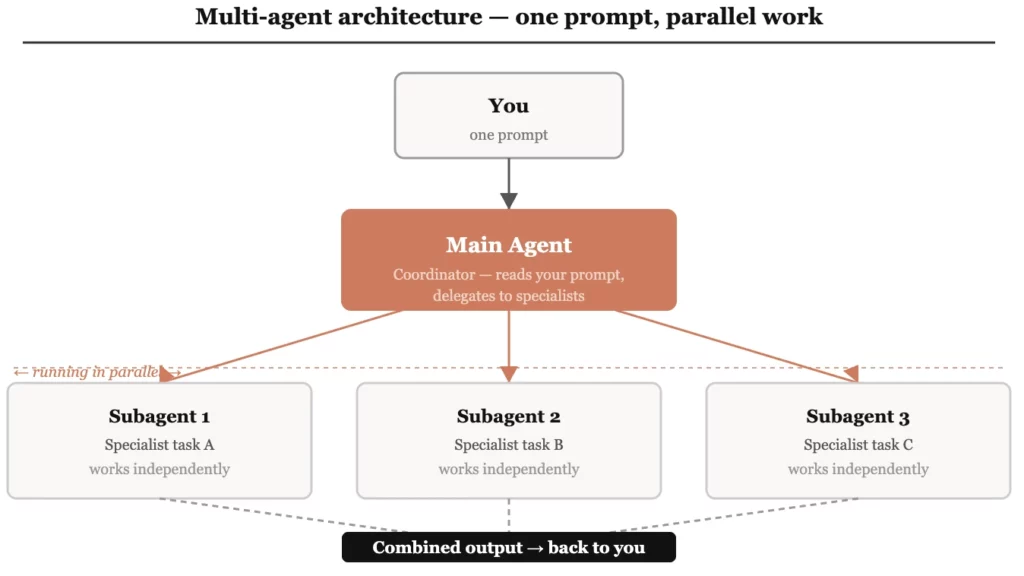
Subagents are specialised Claude instances that a main agent spawns to handle specific tasks simultaneously.
The standard way of working with Claude Code is sequential — you give it a task, it completes it, you give it the next one. Subagents break that pattern. Instead of one agent working through a list, a main coordinator agent spawns multiple specialist agents and sets them to work in parallel.
Each subagent gets its own task, its own tools, and works independently. When they are done, the main agent combines the results.
The practical impact: tasks that would take hours working sequentially can complete in minutes working in parallel. A single well-structured prompt can replace what previously required a team.
Here is what that looks like in practice:
Three analysts. One prompt. One report.
Do subagents need to be configured before you spawn them?
Yes — and there are two ways to do it.
When you spawn subagents, you control what tools each one can access. Two options:
- Inherit all tools from the main thread — the subagent gets everything: file operations, shell commands, MCP tools. Simpler to set up, broader access.
- Specify individual tools explicitly — you define exactly what each subagent can use: read only, grep, diff, bash, a specific MCP. More control, less risk of subagents stepping on each other.
For simple tasks, inheritance is fine. For parallel workflows where subagents are working on the same codebase or dataset simultaneously, explicit configuration prevents conflicts and keeps each agent focused on its specific job.
Can an agent use multiple skills?
Yes. You define which skills it has access to — and can give each skill guidelines for when and how to apply it.
A single agent can have a library of skills available to it. When you give it a task, it reads your request, checks its available skills, finds the best match, and executes. You can also write guidelines into the skill description itself — telling Claude when to use this skill versus another, what triggers it, and what it should never do.
This is how you build agents that make sensible decisions without you micromanaging every step.
Real workflows — what this looks like in practice
Can Claude Code work directly from a design file?
Yes — via an MCP connection to Figma, Claude Code can fetch a design and build from it directly.
The Figma MCP lets Claude reach into your design file, pull the layout, components, and structure, and translate it into working code — without you manually describing what the design looks like or copy-pasting anything between tools.
The design-to-code handoff — one of the most friction-heavy parts of a development workflow — becomes a single prompt:
This is what MCP connections unlock — Claude Code reaching outside your project directory and acting on live external data.
Three more prompts worth keeping
These are the kinds of prompts that show Claude Code operating as a serious engineering tool rather than a sophisticated autocomplete.
Code review across multiple dimensions simultaneously
What this replaces: three separate manual reviews, or three separate prompts run one after another.
Documentation that stays current
What this replaces: hours of manual documentation work that never gets done because it's always deprioritised.
Legacy code you didn't write
What this replaces: two days of archaeology through someone else's codebase.
Tool strategy — thinking like a senior engineer
Should I master Claude Code or spread across multiple AI tools?
Master one. Use different models within it if you need to — but keep your tooling layer simple.
The temptation is to use the best tool for each task — Claude Code for some things, Cursor for others, Codex for something else. In practice, the overhead compounds. Five tools means five different ways of managing context, five different integration patterns, five different mental models to maintain.
What you can do is use different models within the same tool. One workflow that works well in practice: one model handles planning and architecture decisions, a second handles code generation, the first verifies the output. Different intelligence, one unified environment, one set of integrations to maintain.
The engineers extracting the most from Claude Code are not the ones with the most tools. They are the ones who have gone deepest into one.
What is PI agent and when would you use it?
PI agent is a lightweight, model-agnostic alternative to Claude Code — useful when you need to switch models without rebuilding your workflow.
You run it the same way — type pi in your terminal instead of claude — but it lets you connect to different model providers from within the same tool. Claude, OpenAI, others — switchable without changing your setup.
Start with Claude Code. When you reach a specific limitation — a task where a different model genuinely outperforms Claude for your use case — PI agent gives you that flexibility without forcing you to learn a new environment.
Most engineers never need to make that switch. But knowing the option exists is useful.
The engineers getting the most out of Claude Code are not necessarily the most technically advanced. They are the ones who understand the architecture — what agents are, what skills do, what tools are available, and how to put them together deliberately.
That understanding is learnable. And it compounds.
Next Step Forward
This post draws on questions raised during a live Claude Code session run for the Lumen community by Konark Modi of Tesseracted Labs. Part one covers setup, cost, context management, and whether Claude Code is worth your time – the question lying underneath all questions: Can Claude Code Make Me Money?
If you’re navigating AI tools and want to figure out what’s actually useful for your work — not just what’s trending — feel free to reach out for a free 30-min consultation.
If you want to go deeper into learning AI tools, our Bring-Your-Own-Problem program allows you to learn by doing. You bring your own problem, we guide and mentor you closely to do it yourself successfully. So, by the end not only you learn the relevant skills, but also produce a tangible outcome to showcase to your stakeholders.
Use the contact form below or drop us an email at lumen@digitalmunich.com. We’ll get back to you directly.

Dr. Humera Noor
Founder, Lumen | CTO, Digital Munich
Dr. Humera believes that magic happens beyond the comfort zone and consistently ventures into unchartered territories. She brings over 25 years of expertise in artificial intelligence, machine learning, computer vision, and data science. She holds the distinction of being the first female Ph.D. degree holder of the century-old NED University of Engg. & Technology. Her career spans both academia and industry, where she has consistently pushed technological boundaries. Notably, Dr. Humera led a team that pioneered the commercial implementation of machine learning for automating online ad detection, a groundbreaking achievement in the ad-filtering industry.
In addition to her innovative work, Dr. Minhas is deeply committed to education, lecturing at Universities & institutes, conducting webinars & workshops, presenting keynotes and participating in panels, which showcases her dedication to empower the next generation of tech professionals.
Dr. Humera's multifaceted career exemplifies her mission to help individuals become the best version of themselves, living by the principle: "Give a man a fish and you feed him for a day. Teach a man to fish and you feed him for a lifetime."
Dr. Humera can be reached at her LinkedIn.
Contact
Talk to us
Have questions? We’re here to help! Whether you’re curious to learn more, want guidance on applying, or need insights to make the right decision—reach out today and take the first step toward transforming your career.