

Can Claude Code Make Me Money? Here's What Engineers Are Actually Asking
Real questions from engineers about Claude Code — setup, cost, context, CLI vs GUI, and whether it can actually grow your career or income. Answered straight.
At a recent live session on Claude Code hosted by Lumen, one of the last questions of the evening was blunt: "How do I make money with this?"
It was also the most honest question of the night.
Everyone else had been asking about tokens and terminals and tool configuration. But underneath all of it, engineers were really asking something simpler: is this worth my time?
This post answers that — and the twelve other questions that came up during the session. No hype. No tutorial fluff. Just the questions engineers actually asked, and the straight answers.
Part two of this series covers subagents, MCPs, skills, and real-world builds. This part covers the foundation. Read part two here.
Can Claude Code actually make you money?
Yes — and there are more paths than most people realise.
Freelancing. Engineers who can deliver working prototypes, internal tools, and automation workflows in a fraction of the usual time are already charging for it. A project that once took two weeks now takes two days. You charge the same rate. The margin is yours.
Career advancement. Claude Code is becoming standard in professional engineering teams. Knowing how to use it well — not just prompt it, but architect workflows around it — is fast becoming the difference between engineers who get promoted and engineers who plateau. The salary gap between those two groups is not small.
Building your own product. Solo founders and small teams are shipping SaaS products with Claude Code that would previously have required a full development team. If you have a problem worth solving and the ability to direct Claude Code effectively, the barrier to building something real has dropped significantly.
Internal consulting. Companies are paying to have someone come in and implement Claude Code workflows for their engineering teams. If you can demonstrate what it does in a live session — and explain it clearly to both engineers and leadership — that is already a billable service.
The question isn't whether Claude Code has value. It's whether you build the depth to extract it.
What is Claude Code, exactly?
Claude Code is an agentic coding tool that runs in your terminal and acts on your actual project — not just a chat window.
This is the distinction that trips people up. Claude.ai is a conversation. Claude Code is an agent. It reads your entire project directory — every file, every config, every dependency — and can write code, run commands, fix errors, and chain tasks together, autonomously.
You are not copying and pasting suggestions. You are delegating work.
If you haven't read our earlier breakdown of Claude.ai vs Claude Cowork vs Claude Code, that's a useful starting point: Which Claude Do You Actually Need?
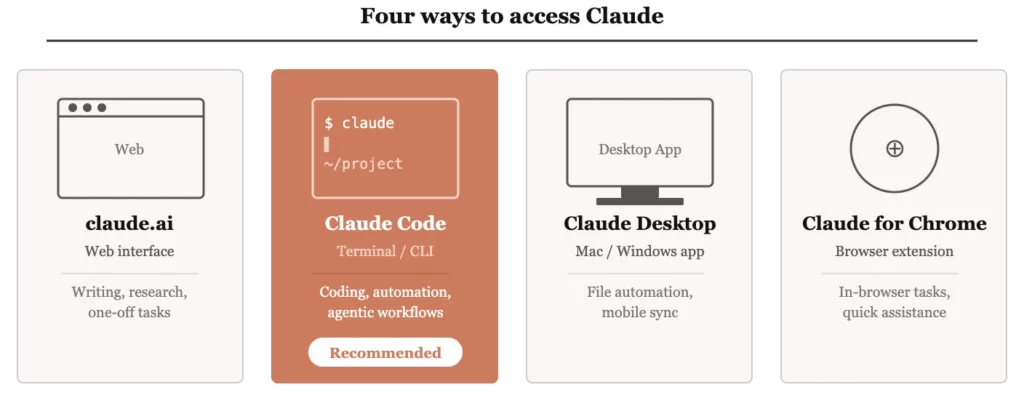
What are the different ways to access Claude?
Four ways — and the feature set is meaningfully different across each one.
| Access method | What it is | Best for |
|---|---|---|
| claude.ai | Web interface | Writing, research, one-off tasks |
| Claude Code (terminal) | CLI agent in your terminal | Coding, automation, agentic workflows |
| Claude Desktop | Mac/Windows app | File automation, mobile sync, non-API workflows |
| Claude for Chrome | Browser extension | In-browser assistance and task execution |
Claude Desktop is worth a specific mention. It syncs with the Claude iOS and Android app — meaning you can draft instructions on your phone and have the desktop execute them. It can also interact with apps on your computer that have no API, making it useful for automating workflows that would otherwise require custom integrations.
Should I use the CLI or the web interface for Claude Code?
Same engine underneath. Very different use cases on top.
The web interface for Claude Code requires a git repository to function properly — which creates friction for many use cases. The CLI has no such constraint. It runs directly in your terminal against whatever project directory you point it at.
A useful way to think about it:
Use the CLI when you need Claude Code to actually do something — touch files, run commands, integrate into a pipeline.
If you're building anything production-grade, you want the CLI. The control and automation possibilities it opens up are not available through the web.
How do I start a new project with Claude Code? What are the best practices?
Start in plan mode. Create a CLAUDE.md file before you write a single line of code.
This is one of those habits that seems slow at the start and saves you hours later. Here's the sequence:
- Open Claude Code in plan mode (not code mode)
- Describe your project — what you're building, who it's for, any constraints
- Ask Claude to generate a
CLAUDE.mdfile that captures the structure, concepts, and approach - Review it. Adjust it. Then switch to code mode and start building
The CLAUDE.md file becomes your project's memory. It tells Claude what kind of project this is, what conventions to follow, and what context to carry into every session. Without it, every session starts cold.
With it, Claude Code starts informed.
What is the context window and why should engineers care?
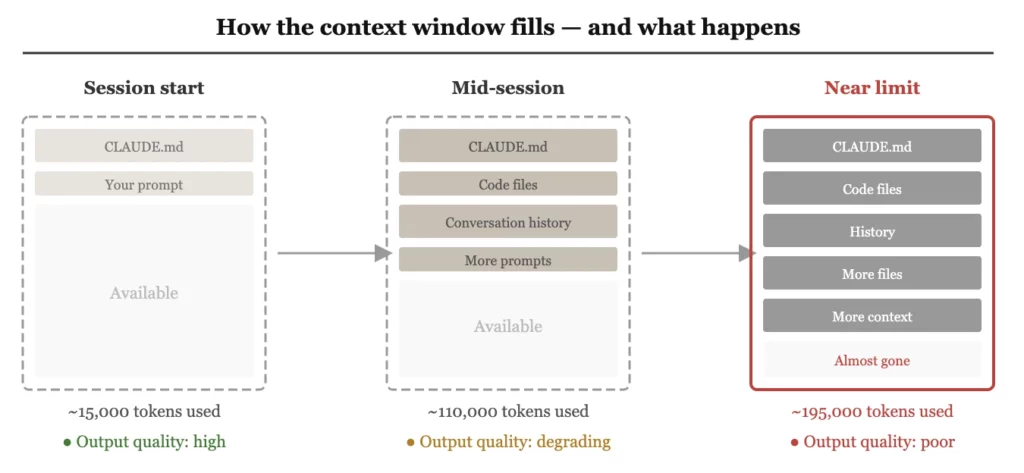
It is Claude's working memory — and it fills up faster than you expect.
The context window is measured in tokens, roughly one token per word. Claude Code can hold approximately 200,000 tokens at a time. That sounds like a lot until you start loading real codebases. A medium-sized project with multiple files, your CLAUDE.md, and a few rounds of back-and-forth can consume that budget quickly.
Two things happen as the context window fills:
- The quality of output degrades. Claude starts losing track of earlier decisions and constraints.
- Your costs rise. Everything in the context window costs tokens on every request.
This is not a minor implementation detail. It is the central engineering challenge of working with Claude Code at scale. The engineers who get the most out of it are the ones who treat context management as a design problem, not an afterthought.
How does CLAUDE.md affect the context window?
In early versions, the entire file loaded every session. Now it's selective — but still needs managing as your project grows.
The evolution here is important. Earlier versions of Claude Code dumped the entire CLAUDE.md into the context window at the start of every session. Newer versions are more intelligent — they search for the relevant parts of the file rather than loading everything.
When starting from scratch, Claude may still load a large portion of the file. As your project matures and your CLAUDE.md grows, this becomes a problem worth solving deliberately.
The recommended approach: start simple. Use CLAUDE.md as your foundation. When it starts causing context bloat, move specific instructions and domain knowledge into dedicated skills — modular instruction sets that Claude loads only when relevant. More on skills in part two of this series.
What happens when Claude Code runs out of context window?
Modern tools compress automatically — but you lose control over what gets kept.
When the context window fills, Claude Code uses a process called compaction: it automatically summarises and compresses earlier parts of the conversation so the session can continue. Six months ago, hitting the limit would throw an error and force you to start over. Compaction is better than that — but it introduces its own risk.
When Claude decides what to compress, you are not in the room. Architectural decisions you made early in the session, constraints you specified, context about how your codebase is structured — any of it can get flattened or lost.
For production workflows and enterprise environments, the answer is to store critical context externally — on your side — and feed it back into Claude when it's needed. Do not rely solely on the model to remember things that matter. Design your workflow so that important information lives somewhere you control.
Costs scale faster than you expect. As your usage grows, token costs compound in ways that catch engineers off guard. The ones building serious workflows are already thinking about how to reduce their token surface area — moving dependencies outside Claude, storing context locally, caching where possible. Not as an optimisation exercise. As a cost survival strategy.
Your work needs to live somewhere you own. If your project context, outputs, and history exist only inside Claude, you have no local copy and no fallback. Platform outage, account issue, pricing change — any of it puts your work at risk. Move your dependencies out before you need to, not after.
What is the difference between the tool and the model?
Claude Code is the tool. Sonnet, Opus, and Haiku are the models. Same engine, very different cars.
This distinction confuses a lot of engineers and it matters practically.
The models — Sonnet 4.6, Opus 4.6, Haiku 4.5 — are the underlying intelligence. Claude Code is the tool that wraps them, adds built-in toolsets, manages the terminal environment, and handles how context is loaded and actions are executed.
You can use those same models through other tools — Cursor, Perplexity, or model-agnostic agents like PI agent. But each tool brings its own system prompts, its own context engineering, and its own set of built-in capabilities on top of the raw model.
Claude Code ships with more built-in tooling out of the box than any alternative. That is its primary advantage when you are starting out: you do not have to build the scaffolding yourself.
Does using Claude through Cursor or another tool give the same result?
Not exactly — and the difference matters more for complex tasks than simple ones.
When you use a Claude model through Cursor, Perplexity, or a third-party agent, that tool is talking directly to the model API and layering its own system prompts, context engineering, and toolset on top. You are getting Claude's intelligence filtered through someone else's design choices.
Claude Code, by contrast, is Anthropic's own layer — built to extract the most from the model for software engineering tasks specifically.
The practical recommendation: start with Claude Code. When you have outgrown what it can do, and only then, look at what other tools offer that Claude Code does not. That point takes longer to reach than most people expect.
How much does Claude Code actually cost?
On a subscription plan, it's included with Pro ($20/month). At API scale, the costs compound quickly if you're not careful.
For individual developers, a Pro subscription gives you Claude Code in the terminal with a shared token budget covering Claude.ai, Cowork, and Claude Code together.
For teams and enterprise workflows using the API directly, pricing is per million tokens:
| Token type | What it covers | Relative cost |
|---|---|---|
| Input tokens | Your prompts, files, context you send in | Lower — e.g. $3–5 per million |
| Output tokens | Code and responses Claude generates | 5× higher — e.g. $15–25 per million |
| Reasoning tokens | The "thinking" a reasoning model does before responding | Charged as output — adds up fast |
The implication: every unnecessary token in your context window costs you on both sides of the equation. Lean context management is not just good engineering practice — it is directly cost-reducing.
Should I master Claude Code or spread across multiple AI tools?
Master one. Use different models within it if you need to — but keep your tooling layer simple.
The temptation is to use the best tool for each task — Claude Code for coding, Cursor for something else, Codex for another thing. In practice, the overhead of maintaining five different tool integrations, five different ways of sharing context, and five different mental models erodes the gains.
What you can do is use different models within the same tooling layer. One workflow that works well: Claude Code handles planning, a different model handles code generation, Claude Code verifies the output. Different intelligence, one unified environment.
Pick your tool. Go deep. The compounding returns from mastering one environment consistently outperform the marginal gains from tool-hopping.
Next Step Forward
This post draws on questions raised during a live Claude Code session run for the Lumen community by Konark Modi of Tesseracted Labs. Part two of this series covers the more advanced questions from the session: subagents, MCPs, skills, multi-agent architecture, and what engineers are actually building with Claude Code today. Read Part 2 to fill your knowledge gap about Claude Code.
If you’re navigating AI tools and want to figure out what’s actually useful for your work — not just what’s trending — feel free to reach out for a free 30-min consultation.
If you want to go deeper into learning AI tools, our Bring-Your-Own-Problem program allows you to learn by doing. You bring your own problem, we guide and mentor you closely to do it yourself successfully. So, by the end not only you learn the relevant skills, but also produce a tangible outcome to showcase to your stakeholders.
Use the contact form below or drop us an email at lumen@digitalmunich.com. We’ll get back to you directly.

Dr. Humera Noor
Founder, Lumen | CTO, Digital Munich
Dr. Humera believes that magic happens beyond the comfort zone and consistently ventures into unchartered territories. She brings over 25 years of expertise in artificial intelligence, machine learning, computer vision, and data science. She holds the distinction of being the first female Ph.D. degree holder of the century-old NED University of Engg. & Technology. Her career spans both academia and industry, where she has consistently pushed technological boundaries. Notably, Dr. Humera led a team that pioneered the commercial implementation of machine learning for automating online ad detection, a groundbreaking achievement in the ad-filtering industry.
In addition to her innovative work, Dr. Minhas is deeply committed to education, lecturing at Universities & institutes, conducting webinars & workshops, presenting keynotes and participating in panels, which showcases her dedication to empower the next generation of tech professionals.
Dr. Humera's multifaceted career exemplifies her mission to help individuals become the best version of themselves, living by the principle: "Give a man a fish and you feed him for a day. Teach a man to fish and you feed him for a lifetime."
Dr. Humera can be reached at her LinkedIn.
Contact
Talk to us
Have questions? We’re here to help! Whether you’re curious to learn more, want guidance on applying, or need insights to make the right decision—reach out today and take the first step toward transforming your career.