

Lesson 2: Programming Logic
Understand the building blocks of communication with a computer.
Estimated Read Time: 1 Hour
Learning Goals
In this lesson, you will learn to:
Technical & Analytical Skills:
Business Acumen:
AI Literacy & AI-Proofing:
Business Rule
If you’re unsure whether a table needs a key, the answer is always yes. Every table should have a primary key.
4.1. Sample Table
| Category | Data Type | Example | Use Case |
|---|---|---|---|
| Integers | INTEGER | 42 | IDs, counts, quantities |
| BIGINT | 9223372036854775807 | Large numbers (e.g., global user IDs) | |
| Decimals | NUMERIC(10,2) | 1499.99 | Currency, precise calculations |
| REAL | 3.14159 | Scientific measurements | |
| Text | VARCHAR(255) | “Sarah Martinez” | Names, emails (limited length) |
| TEXT | Long descriptions | Product descriptions, comments | |
| Dates/Times | DATE | 2024-11-15 | Birthdates, order dates |
| TIMESTAMP | 2024-11-15 14:32:07 | Event logs, transaction times | |
| Boolean | BOOLEAN | TRUE / FALSE | Flags (is_active, is_verified) |
Rule of Thumb
Always choose the most specific data type that fits your data. Don’t use TEXT when INTEGER or DATE is appropriate.
Video 1 – Importing data from SQL dumps
Video 2 – Importing data from compressed archives
Video 3 – Importing data from CSVs
Summary
You’ve now learned the structural foundations of relational databases:
- Database structure fundamentals: Tables, rows, columns with strict data types; primary keys (unique identifiers) and foreign keys (table relationships); indexes for query performance optimization
- Data import methods: SQL dumps for complete databases, compressed archives (.tar/.dat files), and CSV files with AI-assisted table creation
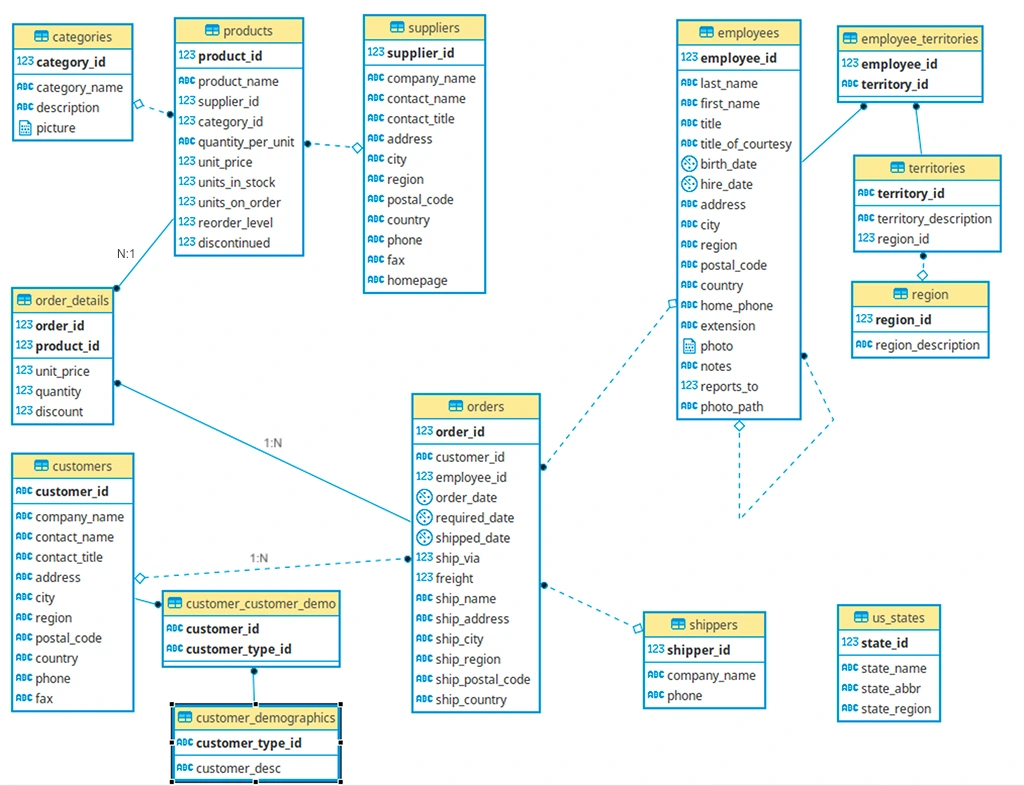
- Schema analysis skills: Read ERDs to trace data relationships; distinguish between fact tables (transactions/metrics) and dimension tables (descriptive context); identify star schema (simple, fast) vs. snowflake schema (normalized, efficient) patterns
- Documentation practices: Create data dictionaries that document table purposes, column definitions, constraints, and relationships—essential for team collaboration and future reference
Suggested References
- Lucidchart – Guide to Entity Relationship Diagrams
Exercise
Estimated Time to Complete: ~2 hours
Task
Submission Format
Submit a single PDF containing the following screenshots:
-
Your pgAdmin table list showing all six tables.
-
Screenshot of successful row count (
3,475,235) -
Your ERD (
.pdfor.png) -
A short text file (
import_notes.txt) describing:-
Any import issues you encountered
-
How you fixed them
-
Anything unclear about the schema
-
Submission & Resubmission Guidelines
1. When submitting your exercise, use this naming format:
YourName_Submission_Lesson#.xxx
If you need to revise and resubmit, add a version suffix:
YourName_Submission_Lesson#_v2.xxxYourName_Submission_Lesson#_v3.xxx
2. Do not overwrite or change the original evaluation entries in the rubric.
Instead, enter your updated responses or corrections in a new “v2” (or later) column in the rubric for mentor review.
Evaluation Rubric
| Criteria | Meets Expectations | Needs Improvement | Incomplete / Off-Track |
|---|---|---|---|
| Database Setup & Table Creation | Successfully runs the schema SQL; all 6 tables created with correct structure and no errors. | Minor issues in table creation (e.g., typos, missing constraints) but schema largely correct. | Schema not created, or tables missing/broken. |
| Data Import Accuracy | All tables correctly populated; Yellow Taxi January data imported with 3,475,235 rows returned from COUNT(*). |
Import attempted but row count is incorrect or table partially filled. | Data not imported or import is corrupted/unusable. |
| ERD Creation (Lucidchart) | ERD includes all 6 tables, uses correct fields, shows thoughtful relationships (even if surrogate keys will be created later). | ERD submitted but missing tables or relationships are unclear/inaccurate. | No ERD submitted or diagram is unusable. |
Contact
Talk to us
Have questions or feedback about Lumen? We’d love to hear from you.